What Happened During That AI Request?
Adding an AI feature is one thing. Understanding how it behaves once people start using it is another.
In FlaskTrack, AI can help draft content, work with laboratory data and plan actions through MCP tools. When a request fails or takes longer than expected, we want to know which provider and model were involved, how long the request took and where things went wrong.
We recently started connecting FlaskTrack to Langfuse, an open-source platform for observing AI applications. We chose to run it ourselves and connect it to the services we already had available.
One Place to Observe Provider Calls
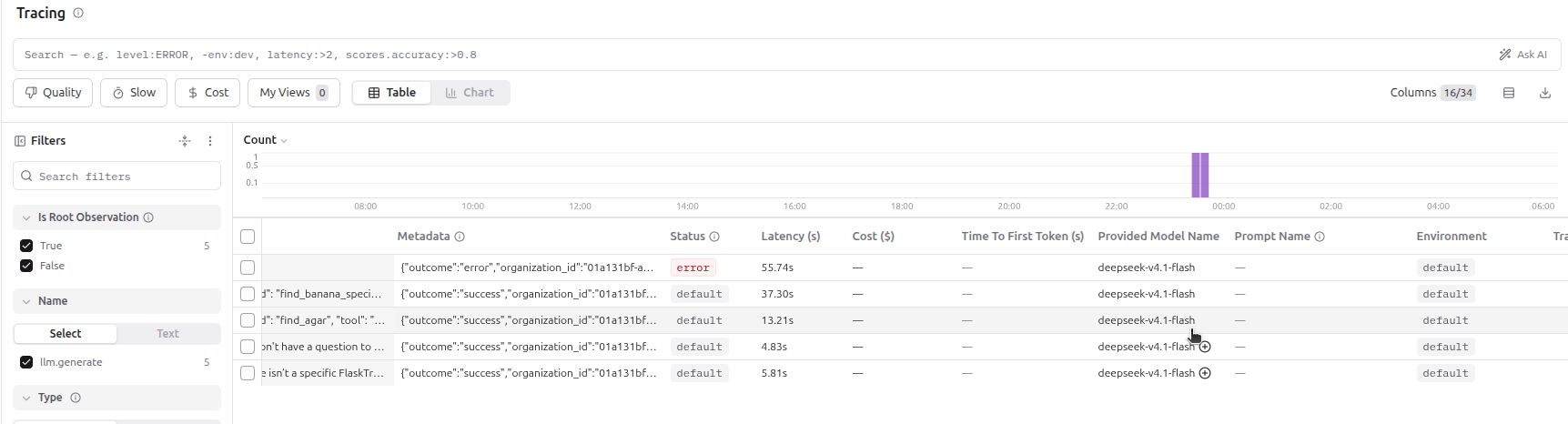
FlaskTrack supports several AI providers. Each has its own API, but the application uses a shared Rust interface to request a completion or stream a response.
That interface gives us a useful place to add tracing. Instead of building separate observability code into every provider, we wrap the provider and record the request around the existing call.
- The provider and model used.
- When the request started and finished.
- Whether it succeeded, failed or was interrupted.
- The organization associated with the request.
The same approach works for both a complete response and a stream. The provider still handles the actual AI request; the wrapper observes the result.
Monitoring Should Not Stop the Work
FlaskTrack needs to keep working if our observability server goes offline. That matters especially while we are running Langfuse locally and connecting to it through a temporary tunnel.
Trace exports run separately from the AI request. They have a timeout, and we limit how many exports can be in flight. If Langfuse is unavailable, the export fails without making the user wait for the monitoring system.
There is a trade-off: a failed export is dropped rather than saved for later. For this first integration, we are comfortable with that. If we need guaranteed delivery in the future, we can introduce a durable queue.
Keep Data Collection Deliberate
Laboratory work can contain sensitive information. A prompt might include experimental context, document contents or details about an organization's work.
For that reason, our integration does not capture prompts and responses by default. Content capture is a separate setting that must be enabled deliberately.
Provider, model, timing and outcome are still useful when investigating many problems. When we do need more detail, we can decide where that data will go and who should have access to it.
Use the Services Already Running
Langfuse uses PostgreSQL, Redis, ClickHouse and S3-compatible object storage alongside its web and worker services. We already had those components available on our Ubuntu machine, so we configured Langfuse to use them instead of starting another set.
PostgreSQL holds application data. Redis supports queues and caching. MinIO provides object storage, and ClickHouse stores the observations we want to query. Langfuse's worker processes incoming events in the background.
Our web and worker containers use host networking for this local setup. That lets them reach services listening on the machine's loopback addresses without exposing the databases to the wider network.
It is a useful way to get started, though it is still a local setup. A production deployment needs its own consideration for capacity, backups, access and availability.
The Small Details Matter
Connecting existing services is rarely just a matter of changing a hostname. We ran into a few ordinary configuration problems along the way.
- MinIO and ClickHouse both wanted to use port
9000, so ClickHouse's native port moved. - The Langfuse bucket needed to be created in our existing MinIO instance.
- MinIO expected the
us-east-1region rather than the supplied default. - ClickHouse needed additional permissions for the system tables Langfuse queries.
Each error pointed to a specific part of the setup. Checking the web and worker logs gave us the information needed to address the actual failure.
Better Visibility, Without Another Dependency in the User's Way
The result is a starting point for understanding how FlaskTrack's AI features behave. We can see provider requests and their outcomes while keeping tracing optional and keeping content capture under our control.
We build software applications, AI integrations and tools that connect the systems a business already uses. Tell us what you would like to build.
Happy Hacking!