
Your Server Already Records Useful Information
I like keeping websites small. Someone visiting a business website, reading documentation or looking up a product should not need to download an analytics stack along with the page.
Before adding another tracking script, look at what your web server already records. Access logs contain requested URLs, response codes, timestamps, response sizes and, depending on configuration, referrers and user-agent strings.
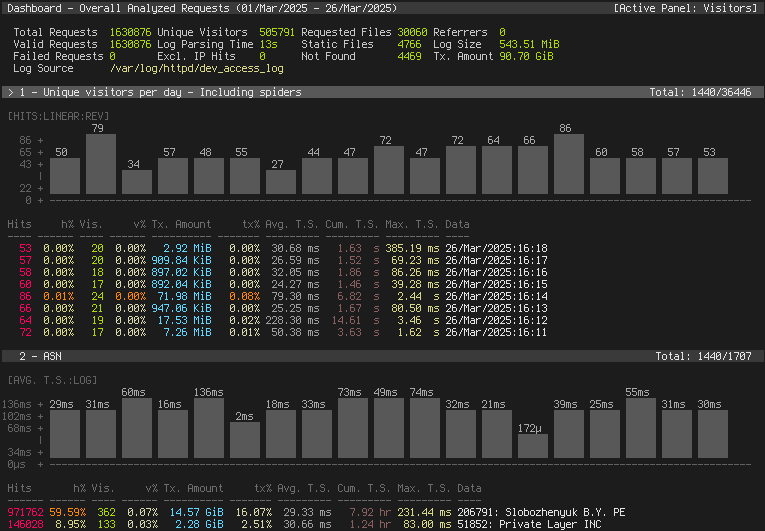
A tool such as GoAccess can turn those logs into useful reports without changing your application or adding tracking code to public pages.
Fewer Downloads, Fewer Moving Parts
Browser-based analytics can introduce JavaScript downloads, additional network requests and processing on the visitor's device. Third-party services also introduce dependencies outside your own infrastructure.
Log-based analytics moves that work to the server. Visitors receive the content they requested, while a separate job processes the access logs.
- No analytics script to download or execute on public pages.
- No additional browser requests to send tracking events.
- No analytics cookies required by this approach.
- No separate analytics database server required for generated reports.
- No analytics integration to maintain inside every application.
Removing tracking assets can reduce page weight and visitor bandwidth. Processing logs still consumes server resources, but you control when that work runs and how much history it processes.
A Small Reporting Pipeline
A straightforward setup uses Nginx, GoAccess and a systemd timer. Each website writes to its own access log. A scheduled job reads those logs and generates an HTML report, which Nginx serves through a password-protected HTTPS endpoint.
- Nginx: handles requests and records access logs.
- GoAccess: converts those logs into reports.
- A scheduled job: refreshes reports at an appropriate interval.
- A protected endpoint: lets authorised users view the results.
Refreshing every five or fifteen minutes may be plenty for a small website. There is no need to maintain a live analytics connection when a periodically generated file answers the questions you have.
The generated dashboard can use JavaScript for its own interface. That code runs when someone opens the dashboard; it is not added to the public pages being measured.
Agents May Never Run Your Tracking Script
Website traffic includes search crawlers, AI research tools and autonomous agents. Some use a browser, while others fetch HTML or call endpoints directly without executing page scripts.
JavaScript-based analytics can miss those direct requests. Access logs record them when they reach your web server, giving you visibility into activity that would otherwise be absent from the dashboard.
That can help you understand which documentation gets requested, whether automated clients encounter broken links, and which endpoints receive repeated or expensive requests.
An agent researching your business may read your services, pricing and contact pages without producing a single browser analytics event.
Include API and MCP Traffic Where It Reaches Your Proxy
The same principle applies to APIs and HTTP-based MCP services. When their traffic passes through Nginx, access logs can provide request counts, response codes and, with suitable logging configuration, request durations.
This helps answer operational questions: Are clients reaching the endpoint? Are requests failing? Is traffic increasing? Are responses becoming slower?
An access log does not explain everything happening inside the request. Multiple MCP operations may share one HTTP endpoint, and a long-lived connection does not map neatly to individual tool calls. Application-level metrics are still useful for tool execution, model usage and workflow outcomes.
Start with the visibility your proxy provides, then add instrumentation for the questions it cannot answer.
Turn Aggregated Analytics Into Useful Context
A dashboard helps someone inspect activity. Aggregated analytics can also provide context for agents and AI-assisted workflows, reducing the amount of routine investigation someone needs to do by hand.
Our approach is to give those workflows a small, structured summary of relevant activity: the reporting period, frequently requested pages, recurring errors, changes in traffic and the services affected. GoAccess can produce JSON as well as HTML, providing a starting point for that processing.
Rather than asking an agent to look through an entire website for something to improve, we can give it a specific observation: a frequently requested documentation page is returning errors, or a service page is receiving more requests than it did in the previous period.
That observation becomes a starting point for investigation. It does not, by itself, explain why the change happened or prove that customer demand increased.
Give Automations a Specific Job
Useful automation connects an observed condition to a defined task. With the right business context and permissions, an agent could:
- Investigate recurring errors: check affected URLs, inspect relevant application information and prepare a repair task.
- Prepare documentation updates: identify heavily requested pages and draft improvements using approved product information.
- Summarise operational changes: produce a short report of traffic shifts, failing endpoints and issues that need attention.
- Prioritise performance work: flag frequently requested routes with elevated response times when timing data is available.
- Support business planning: compare page traffic with authorised enquiry, booking or order data to help identify where further investigation would be useful.
The value comes from connecting the analytics to the tools the business already uses. A workflow might read an aggregate report, retrieve approved documentation through MCP and prepare a task in an internal system.
This can free staff from repeatedly checking dashboards, collecting the same information and writing routine summaries. They receive a prepared finding with supporting evidence and a clear next step.
Keep Decisions and Permissions Explicit
Analytics provides evidence for a workflow; it does not authorise every possible action. Preparing a suggested correction is different from publishing it. Flagging a slow endpoint is different from restarting a production service.
Define which tasks may run automatically, which require review and what information the agent may access. Keep those rules in application code and tool permissions.
Access logs also contain visitor-supplied text, including URLs, referrers and user-agent strings. Treat that material as untrusted data, never as instructions for an agent. Prefer bounded aggregates over passing raw logs into a model.
A useful result should identify the reporting period, explain what changed and link to the evidence. Someone reviewing it should be able to understand why the task was proposed.
Keep Automated Traffic Available for Inspection
Filtering recognised crawlers can make a readership report easier to interpret. It can also hide activity you want to investigate. Consider keeping a filtered report alongside a broader view of requests.
User-agent strings offer clues, but they do not reliably establish who operates a client. Bots can resemble browsers, and unfamiliar agents may not match known crawler lists.
Treat request counts and visitor estimates accordingly. A request is not necessarily a page view, and a page view is not necessarily a person. Responses served entirely from browser caches or a CDN may never reach your origin server.
Manage Logs and Reports Deliberately
Removing browser tracking does not make access logs free of sensitive information. Logs can contain IP addresses, query parameters and private URLs.
Restrict access to raw logs and reports, choose a retention period, and avoid recording credentials or sensitive query parameters. Anonymising IP addresses in a report does not remove the original addresses from the source logs.
Apply the same care when preparing AI context. Include only the information needed for the task, keep each client's data separate and control which systems receive it.
A simple reporting job can rebuild its output from retained logs. As traffic grows, repeatedly processing the entire history becomes more expensive. Adjust the reporting interval, retention or processing strategy when the workload warrants it.
Measure What You Need
Log-based analytics works well for understanding requested pages, traffic patterns, referrers, errors and bandwidth. It does not automatically measure button clicks, reading time or interactions that never make a server request.
Begin with the questions that matter to your website. If access logs answer them, a small reporting pipeline can give you useful visibility while reducing visitor downloads and the number of services you maintain.
Those same summaries can help agents investigate issues, prepare useful work and reduce routine administration. Keep the inputs focused, the tasks specific and the results reviewable.
We build software applications, AI integrations and automations that connect business systems and free people to spend more time on their work. Tell us what you would like to build or connect.
Happy Hacking!